


TransLoc
3.2788.00 Reviews
App Specs
- Version
- 5.4.2
- Updated On
- License
- Free
- Downloads
- 500,000+
- Developer
- TransLoc
- Categories
- Maps & Navigation
- Platform
- Android
Screenshots
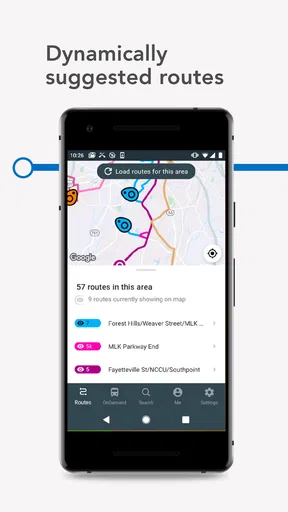
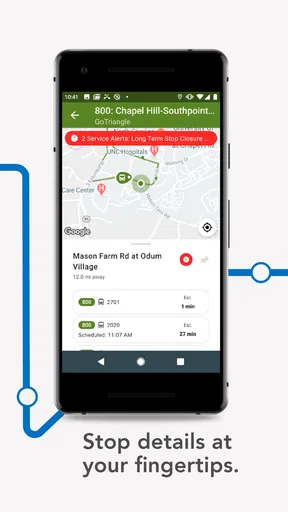
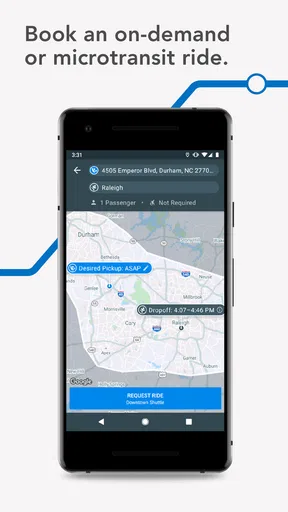
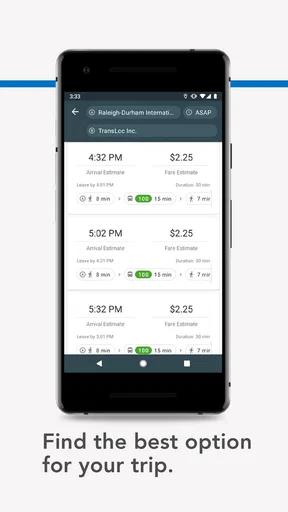
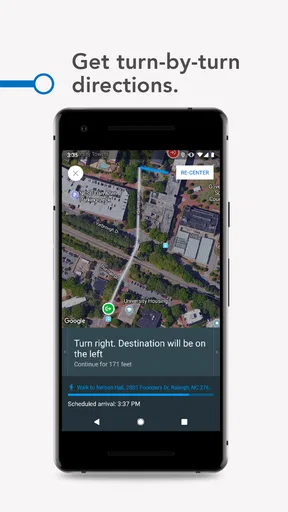
 Analysis by AppCompare
When I first opened TransLoc, I understood its appeal immediately: it is a free Maps & Navigation app built around public buses, with arrival information placed closer to the decision I actually need to make—whether to wait, walk, or choose another ride. The developer is TransLoc, and the app is aimed at people who use participating bus services rather than at drivers looking for turn-by-turn navigation.
That distinction matters. I would not treat it as a universal replacement for a general map app. Its useful moment comes when I already know I want to travel by bus and need a clearer idea of what is happening with that service. The store summary also points to a second possibility: in supported situations, a user may be able to request a ride from the bus agency. That makes the app more interesting than a simple timetable viewer, although the exact experience depends on the transit service connected to it.
TransLoc has been available since September 8, 2017, and its current version is 5.4.2. It supports Android 7.0 and later, is rated for Everyone, and has passed over 500 thousand installs. Its average rating is 3.2 from about 1.8 thousand ratings, so I would approach it with practical expectations: useful for the right transit network, but not an app I would assume will work equally well for every rider in every city.
Getting from installation to a useful bus update
Before I rely on a bus update for a real trip, I like to make sure I can get from opening TransLoc to the right stop without rushing. In this section, I’ll focus on a calm first check and a couple of practical ways to catch a route or direction mismatch early, so the next part can turn to what to expect before getting started.
What to expect before you begin
The first thing to understand is that TransLoc is service-dependent. A bus app can look polished and still feel limited if the local agency does not provide the routes, arrival information, or ride-request option you need. I would therefore begin by thinking about the specific bus system I use most often. If my daily route is covered, the app can become a quick check before leaving home. If it is not, a city transit app or a broad mapping service may be the more sensible choice.
The experience is best viewed as a live transit companion rather than a complete trip planner for every mode. My usual workflow would be simple: open the app, identify the relevant agency or service, find the route or stop, and check the next arrival before walking to the stop. That sequence is more useful than opening it without knowing which bus I need and expecting it to design an entire journey automatically.
I also like the fact that the app is free. There is no purchase decision to make before trying it, which lowers the risk for occasional riders, students, visitors, and anyone testing a local bus service for the first time. The Everyone rating makes it suitable for a broad audience, though younger users should still follow the normal guidance of their family or transit provider when arranging rides.
Worth Reading Before You Choose

EA SPORTS FC Mobile 26 Is a Bigger Football Game, but It Takes Time

Flipboard Shows What News Apps Must Do Beyond the Feed

Switching to Android Auto Means Rethinking Your Driving Routine

Google Calendar Makes a Crowded Week Easier to Manage

Ludo King Makes the Most of the Minutes Between Plans

Baby Panda World Brings Quick Play to Modern Phones, but Its Game Library Feels Busy
The first setup should be approached patiently
After installing it, I would avoid rushing through the first screen. Look for the place where the relevant transit agency, route, or stop can be selected. The important setup choice is not a personal profile or a decorative preference; it is making sure the app is connected to the bus service I actually intend to use. Choosing the wrong agency can make a perfectly good app appear empty or irrelevant.
If the app asks for a location, I would consider whether automatic location is genuinely convenient for my situation. At a familiar bus stop, selecting a route or stop manually can be more deliberate. In an unfamiliar neighborhood, location can reduce searching. The trade-off is straightforward: location-based discovery saves time, while manual selection gives me more control over exactly which stop I am checking.
My practical advice is to set this up while connected to a reliable network and not while already running late. The first test should happen before a real appointment. Search for a stop I know, compare the displayed route with the sign at that stop, and make sure the direction makes sense. This small check prevents one of the most common transit mistakes: choosing the correct route number but the wrong travel direction.
Another useful habit is to learn the naming used by the agency. A stop may have a formal name that differs from the landmark I use in conversation. If I search only by a nearby shop, campus building, or street nickname, I may waste time assuming the app lacks the stop. Once I know the agency’s wording, future checks should be quicker and less frustrating.
The first meaningful success is a verified arrival check
For a first successful action, I would not begin with a complicated journey. I would choose a regular trip and use TransLoc to answer one narrow question: is the next bus close enough for me to leave now? Open the relevant service, locate the stop, inspect the next arrival, and compare it with the physical stop information if available. That gives the app a fair test without depending on a long chain of connections.
This is where the app can earn a place on my phone. A static schedule tells me what should happen, but an arrival view is more useful when I am deciding whether to finish breakfast, leave the office, or cross the street to the stop. I would still treat the displayed time as guidance rather than a guarantee. Traffic, boarding delays, detours, and changes at the agency level can all affect a bus after I have checked it.
A realistic example is a weekday appointment across town. I know the stop near my apartment and the bus route I normally take, but I do not want to stand outside unnecessarily. I check TransLoc before putting on my coat. If the arrival looks close, I leave immediately. If it is farther away, I can finish preparing rather than guessing. Once I reach the stop, I check the route direction again instead of assuming the first result is the right one.
The app is also useful for a less obvious situation: deciding whether a missed bus has actually ruined the trip. Rather than abandoning public transport after seeing one bus depart, I can check the next arrival and compare that delay with the time and cost of another option. That makes the app valuable as a decision tool, not merely as a digital timetable.
Requesting a ride requires a different mindset
The ride-request capability deserves separate attention because it is not the same as checking a bus arrival. Where the connected bus agency supports it, I may be able to request a ride from within the service experience. I would read the available instructions carefully and confirm the pickup details before relying on it for an important trip.
I would not plan around this option until I had tested the process on a low-pressure journey. A first-time request made just before work or a medical appointment leaves little room for confusion. A short local trip is a better test: it lets me understand what information the agency expects and how the request fits into my normal travel routine.
The key trade-off is convenience versus certainty. Requesting a ride may be more flexible than waiting for a fixed bus, but it is still governed by the participating agency’s service area and operating rules. If the option is not shown for my location, that does not mean the whole app is broken; it may simply mean my local service uses TransLoc for arrival information but not for ride requests.
Common points of confusion during everyday use
The most likely source of confusion is the difference between a route and a stop. A route can pass through many locations, while the arrival I need belongs to one particular stop and direction. I would always confirm both before walking. This is especially important near large campuses, downtown streets, transit centers, and paired stops on opposite sides of a road.
Another issue is interpreting an arrival estimate too literally. If I see a bus listed as arriving soon, I still need time to reach the stop and identify the correct boarding point. I would avoid starting a long walk based on a very narrow margin. For a reliable routine, I check the app before leaving, then check again when I am near the stop if the timing is important.
Users may also wonder why a familiar route is not appearing. I would first check the selected transit agency, spelling, stop name, and direction. Then I would compare the result with the agency’s own signs or service information. This troubleshooting order is faster than repeatedly closing the app. It separates a selection mistake from a genuine service-data problem.
There is also a broader limitation: an arrival app cannot tell me everything that affects a journey. It may help me see the bus, but I still need to know whether the stop is accessible, whether a transfer is practical, or whether a temporary road closure changes the route. For a complex trip involving walking, rail, cycling, and several transfers, I would compare TransLoc with a full mapping app instead of asking one tool to do every job.
The average rating of 3.2 suggests that experiences are mixed, and I think the reason is likely to be tied closely to local usefulness rather than to one universal experience. A rider whose agency supplies dependable information may find the app genuinely convenient. Someone outside a supported or well-maintained service may find fewer reasons to return. I would judge it by the quality of my own local results after a short trial.
Who will get the most from it?
TransLoc makes the most sense for regular bus riders who already know their main routes and want faster access to arrival information. It is particularly practical for someone who checks the same few stops every day, because the benefit comes from reducing uncertainty at the moment of departure. It can also help occasional riders who want to test public transport without memorizing a paper schedule.
Students, commuters, visitors, and people who do not drive every day may all find a use for it, provided their agency is represented. The free price is helpful for anyone who wants to try it without committing money, and the straightforward purpose keeps the learning curve manageable once the correct service is selected.
I would be more cautious about recommending it to someone who expects a single app to plan every part of a complicated journey. If I need detailed walking directions, multiple transport modes, extensive place discovery, or broad coverage across many cities, a general maps platform may be better. If my local agency has its own highly detailed app with alerts, accessibility information, ticketing, and service notices, that official option may also be the stronger everyday choice.
How it compares with the usual alternatives
Compared with a printed timetable, TransLoc is more convenient for checking whether the next bus is approaching rather than merely knowing the planned schedule. Compared with a general mapping app, its focus is narrower: I would use it when the bus service itself is the main question, not when I need a complete exploration of every route and destination.
Compared with an official agency app, the choice depends on what I value. An official app may have deeper local information and direct notices, while TransLoc can be appealing when I want a simple arrival check or when the agency has connected its service to the app’s ride-request workflow. I would keep both only if each solves a different problem; otherwise, two apps showing similar information may add clutter instead of clarity.
One of the more useful trade-offs is speed versus context. TransLoc can be the quicker tool for answering “when is my bus coming?” A broader alternative may be slower to open or more crowded with options, but better for answering “how do I get there from my exact location?” I would choose based on the question in front of me rather than assuming one app must win every comparison.
Small habits that make the app more dependable
I would save a simple mental routine: agency first, stop second, direction third, arrival time fourth. That order sounds obvious, but it prevents the most damaging error—seeing a plausible time for a bus that is traveling away from me. I would also check the destination shown for the route when the app presents one, especially at stops served by several branches.
For important appointments, I would use the app to estimate when to leave but keep a buffer. I would also confirm the result near departure instead of relying on a check made much earlier. This is not a criticism unique to TransLoc; it is a sensible way to use any live transit estimate.
If I use the ride-request function, I would treat the first request as a learning trip. I would note where the pickup is expected, how early I need to be ready, and whether the service behaves differently from a fixed-route bus. That experience would tell me more than assuming the feature works like a standard taxi app.
Finally, I would keep a backup method for days when the information looks unusual. The agency’s own notices, a stop sign, or a second mapping tool can help distinguish a delayed bus from a selection error. The goal is not to distrust TransLoc; it is to avoid making one screen responsible for a time-sensitive journey.
My recommendation after using it
I see TransLoc as a focused, low-risk option for checking bus arrivals and, where supported, exploring a ride request from the local agency. Its strongest moment is the ordinary one: I am about to leave, I know the stop, and I want a better answer than “the schedule says it should be here.” That narrow purpose can save time and reduce the guesswork of daily bus travel.
At the same time, I would not install it expecting universal coverage or a complete replacement for an official transit service and a full mapping tool. The first meaningful test is simple: select the correct agency, find a familiar stop, verify the direction, and use the arrival information for a low-pressure trip. If that workflow is accurate and convenient in my area, the app has earned a place in my routine.
My final view is cautiously positive. The free app, broad age rating, and focused bus tools make it easy to try, while its mixed average rating is a reminder to judge the local experience rather than the concept alone. For a rider whose agency is well represented, the best reason to keep TransLoc is the confidence it adds before walking to the stop. For someone needing comprehensive trip planning or guaranteed local coverage, I would choose a more specialized alternative instead.
Pros
- Real-time vehicle locations make waiting at stops more predictable.
- Supports multiple transit agencies in one app.
- Service alerts help users react to delays and route changes.
- Stop details can show upcoming arrivals and scheduled times.
- Free to download and useful for daily public transit riders.
Cons
- Coverage depends on whether your local agency uses TransLoc.
- Arrival predictions can be inaccurate during disruptions or heavy traffic.
- Some agencies provide fewer features or less detailed data.
- The interface may feel confusing when several routes overlap.
- Background location and notification access may affect battery usage.
FAQs for TransLoc
What is TransLoc, and what can I use it for?
TransLoc is a public transportation app designed to help riders view nearby transit services, routes, stops, schedules, and vehicle locations where supported by the local transportation agency. After selecting an available agency or service area, you can use the app to plan trips, check departures, and follow buses or shuttles on a map. The exact features depend on the transit provider connected to TransLoc.
Does TransLoc provide real-time bus or shuttle tracking?
In many supported locations, TransLoc displays real-time vehicle positions and estimated arrival information, which can make it easier to decide when to leave for a stop. However, live tracking is not guaranteed for every route or agency. Some providers may only offer scheduled times, while GPS updates can occasionally be delayed or inaccurate because of connectivity, equipment, or service interruptions.
Can I plan a complete trip with TransLoc?
TransLoc may help you find routes, stops, departure times, and connections, depending on the features enabled by your local transit agency. It is particularly useful for checking available services and monitoring vehicles, but coverage and trip-planning capabilities vary between locations. Before relying on the app for an important journey, compare its directions and times with official agency notices, especially during disruptions or special events.
Is TransLoc free to download and use?
TransLoc is generally available as a free download for Android and iOS users, although mobile data charges may apply when maps, schedules, or live vehicle information are loaded over a cellular connection. The app itself does not replace a transit fare, ticket, or pass. Any payment required for riding must normally be handled through the transportation agency’s accepted methods or another official ticketing service.
What should I know about location access, notifications, and privacy?
TransLoc may request location permission to show nearby stops, services, or your position on the map, while notifications can be useful for service updates if the local agency supports them. You can usually manage these permissions in your device settings, but disabling them may reduce convenience or limit certain functions. Review the app’s current privacy policy before downloading, since data practices and available features may change over time.


